
What Does Switzerland Export To The US? A Detailed Guide
Switzerland plays a vital role in U.S. trade, supplying a wide range of high-value and specialized products. From pharmaceuticals and



In the complex world of international trade, staying ahead of the curve on compliance and security is vital. One integral part of this puzzle is keeping a watchful eye on your Importer Security Filing (ISF) status. The ability to effortlessly track the progress of your ISF filings can save you from potential headaches, delays, and penalties. Therefore, let’s address the process of how to check the filing status.
In this blog, we will delve into the significance of routinely checking your ISF filing status and introduce you to a remarkable ally: Artemus‘ Software Solution. Discover how Artemus’ ISF software can be your trusted companion in efficiently managing and monitoring your ISF status, ensuring your global shipments arrive at their destinations seamlessly and without complications.
Table Of Contents
ISF Filing Status refers to the current stage or condition of an Importer Security Filing (ISF) after it has been submitted to U.S. Customs and Border Protection (CBP). This status reflects whether the filing has been accepted, rejected, amended, or is still pending.
The ISF, commonly known as the “10+2” filing, is required for ocean shipments entering the U.S. It must be submitted at least 24 hours before cargo is loaded onto the vessel at the foreign port. The ISF Filing Status helps CBP track shipment compliance, validate security data, and match your filing with the associated bill of lading.
A correct ISF status ensures your filing is matched to the cargo manifest and aids in risk assessment. Statuses such as “Accepted,” “Rejected,” or “No Bill Found” are common indicators importers need to interpret accurately to maintain compliance and avoid delays or penalties.
Related: ISF Declaration: Meaning, Purpose, Timeline, & Process

To check your Importer Security Filing (ISF) status, you have several reliable methods depending on how the filing was submitted:
Related: ISF Late Filing Fee: Exact Cost & 6 Tips To Manage Appeals

Understanding ISF status messages is pivotal for importers and customs compliance. In this guide, we will demystify the meanings behind ISF status messages and outline the necessary actions required to ensure a smooth international trade process.
1. “Accepted”: This status indicates that your ISF filing has been successfully received and processed by U.S. Customs and Border Protection (CBP). No immediate action is required.
2. “Rejected”: If your ISF is rejected, it means there are errors or missing information. You must review the rejection message carefully, correct the issues, and resubmit the filing.
3. “Pending”: A “Pending” status suggests that CBP is still processing your ISF. It’s essential to monitor it regularly, as further actions might be necessary depending on CBP’s feedback or requests for additional information.
4. “Hold” or “Exam Hold”: If your ISF is placed on hold, CBP may be conducting additional inspections or reviewing your submission. You should be prepared for potential delays and remain in contact with CBP or your customs broker.
5. “Cancelled”: A “Cancelled” status typically means that the ISF filing is no longer required due to changes in your shipping plans. In such cases, you should update your records accordingly.
6. “Amended”: An “Amended” status indicates that you’ve made changes to your ISF after the initial submission. Ensure that the amendments align with CBP regulations and requirements.
7. “No Bill Found”: This message suggests that the bill of lading information provided in your ISF does not match the CBP records. Verify the bill of lading details and resubmit if necessary.
Interpreting ISF status messages correctly allows you to take appropriate actions, ensuring compliance with customs regulations and smooth import operations. Regularly monitoring the status and promptly addressing any issues is key to a successful import process.
Related: ISF Bond Cost Breakdown & Management For Import Success
ISF filing status codes, also known as ISF disposition codes, are messages issued by U.S. Customs and Border Protection (CBP) to indicate the current status of your Importer Security Filing (ISF). These codes help importers determine whether their ISF has been filed successfully, if it meets compliance requirements, and whether it matches a bill of lading in CBP’s Automated Manifest System (AMS).
Understanding these codes is essential for maintaining compliance, preventing delays, and ensuring smooth cargo clearance.
S1 – Bill of Lading Match
The ISF has been filed and successfully matched with a bill of lading in AMS. This confirms that the ISF is in good standing.
S2 – No Bill Match
The ISF was filed, but CBP could not match it to a bill of lading in AMS. You should verify the bill number and filing details immediately.
S3 / S4 / S5 – No Bill Match (5, 20, or 30 Days After Filing)
The ISF remains unmatched even after a specified period following submission. This indicates a persistent issue that must be corrected to avoid holds or penalties.
S6 – No Bill Match, Wrong Type
The bill of lading exists in AMS but is a different type (e.g., house vs. master) than what was entered in the ISF. Correct the mismatch and refile if needed.
S7 – Duplicate ISF Filing
Another party has submitted an ISF using the same bill of lading and importer ID. Investigate for possible duplicate submissions or coordination issues.
3Z – ISF On File
The ISF has been submitted and is officially on file with CBP. This is a standard confirmation message indicating the filing has been received.
2O – ISF Hold for No ISF on File
A hold has been placed because no ISF was located for the shipment. Immediate filing is required to release the hold.
2P – ISF Hold for ISF Compliance Issue
A hold was applied due to errors, inconsistencies, or violations in the ISF. Corrections must be made to proceed with clearance.
2Q – Do Not Load – No ISF on File
The shipment cannot be loaded onto the vessel because no ISF was submitted. This is a critical issue that must be resolved before departure.
2R – Do Not Load – ISF Compliance Issue
The shipment is barred from loading due to serious compliance violations in the ISF data. Corrections are required to lift the restriction.
4O – ISF Hold Removed – No ISF on File
The previously applied hold due to missing ISF has been lifted after successful filing.
4P – ISF Hold Removed – ISF Compliance Issue
The hold caused by a compliance error has been removed after corrections were made.
4Q – Do Not Load Removed – No ISF on File
The “Do Not Load” instruction was lifted once the missing ISF was filed and accepted.
4R – Do Not Load Removed – ISF Compliance Issue
The “Do Not Load” flag was removed after resolving the ISF compliance problems.
Related: ISF Form (Import Security Filling): Elements & Top Practices
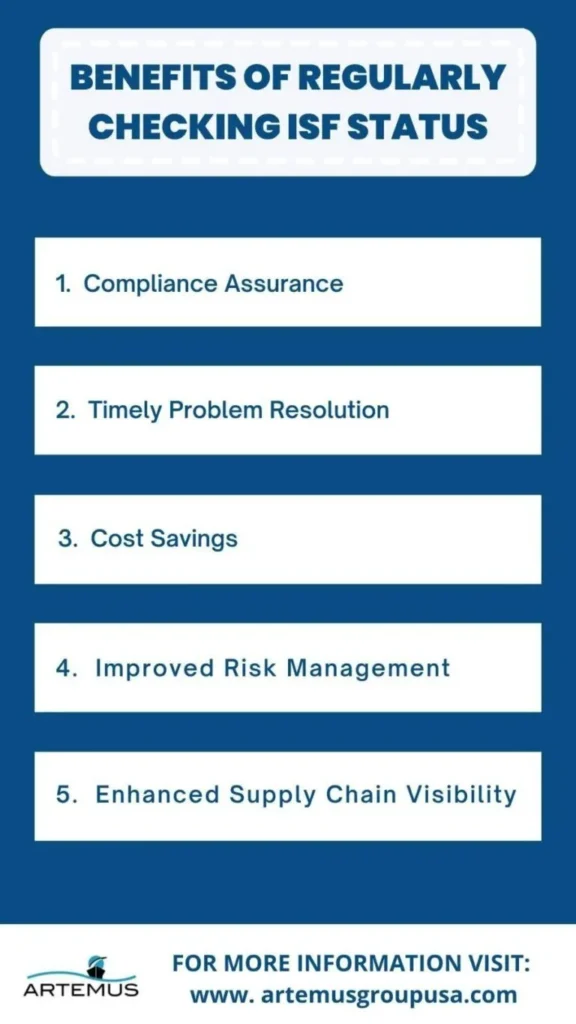
Regularly checking ISF (Importer Security Filing) status offers numerous advantages for importers and supply chain management. It ensures compliance with customs regulations, minimizes costly delays and enhances overall operational efficiency. Discover the multifaceted benefits of consistently monitoring your ISF filings to optimize your international trade processes.
Regularly checking your ISF status ensures that you are in compliance with the U.S. Customs and Border Protection (CBP) regulations. Non-compliance can lead to fines, penalties, and delays in your shipments. By staying up-to-date with your ISF filings, you can avoid these issues and maintain a good relationship with customs authorities.
Monitoring your ISF status allows you to identify and address any discrepancies or errors in your filings promptly. This helps prevent costly delays or disruptions in your supply chain. Early detection of issues enables you to rectify them before your goods arrive at the U.S. port, ensuring a smoother and more efficient import process.
Regularly checking your ISF status can help you optimize your import operations and potentially reduce costs. By staying informed about filing deadlines and requirements, you can avoid rush filings, which are often more expensive. Additionally, identifying and addressing issues early can prevent costly fines and storage fees.
ISF status checks contribute to better risk management in international trade. You can assess potential risks associated with your shipments and take proactive measures to mitigate them. This includes evaluating the accuracy of your ISF data, monitoring changes in customs regulations, and staying updated on security threats that may impact your cargo.
Regular ISF status monitoring provides greater visibility into your supply chain. You can track the progress of your shipments and anticipate any potential bottlenecks or delays. This enhanced visibility enables you to make informed decisions, such as adjusting inventory levels or optimizing transportation routes, to ensure efficient supply chain operations.
In summary, regularly checking your ISF status is essential for ensuring compliance, resolving issues promptly, reducing costs, managing risks, and enhancing the overall visibility and efficiency of your international trade operations. It’s a proactive practice that can lead to smoother import processes and better financial outcomes.
Related: Late ISF Filing: What To Do If Missed The Deadline?
Effective ISF (Importer Security Filing) status monitoring is crucial for smooth international trade operations. To ensure compliance and minimize risks, here are five best practices to guide you in monitoring ISF status efficiently and proactively.
Implement automated systems or software that can generate alerts and notifications for important ISF-related milestones, such as filing deadlines, status updates, and any customs holds or issues. This ensures that you are always aware of the current status of your shipments without having to manually check each one.
Periodically review and update the ISF data for your shipments. Ensure that all information is accurate and up-to-date, including bill of lading details, consignee information, and product descriptions. Timely data correction can prevent delays and customs-related problems.
Keep a centralized and organized record of all your ISF filings and related documents. This can include filing confirmation receipts, customs correspondence, and compliance records. Having a central repository makes it easier to access historical data and track the progress of each filing.
Clearly define roles and responsibilities within your organization or among your partners involved in the import process. Assign specific individuals or teams to oversee ISF status monitoring, filings, and issue resolution. Having a designated point of contact for ISF-related matters ensures accountability and swift action when needed.
Stay updated on changes in customs regulations and security requirements. Customs laws can evolve, and new rules may be introduced. Regularly review guidance from customs authorities and industry publications to ensure that your ISF practices remain compliant with current standards.
Related: When Does ISF Need To Be Filed? Know The Deadline
Automated tools play a pivotal role in streamlining and improving the process of Importer Security Filing (ISF) status monitoring and filing. These tools offer several benefits, such as real-time tracking of filing deadlines and updates, ensuring data accuracy through validation checks, and providing automated notifications for customs holds or discrepancies.
Additionally, they can integrate with your supply chain management systems, enabling seamless data exchange and reducing manual data entry errors. Overall, automated tools enhance efficiency, reduce the risk of compliance issues, and save time and resources by simplifying the complex ISF filing process.
Related: ISF Filing Process: A Detailed Step-By-Step Guide
Artemus’ ISF software solution is a valuable asset in effectively managing Importer Security Filing (ISF) status. It simplifies the entire process by automating the tracking of filing deadlines, ensuring data accuracy through rigorous validation checks, and generating real-time notifications for any customs holds or discrepancies.
The ISF software seamlessly integrates with existing supply chain management systems, facilitating data exchange and reducing the risk of manual data entry errors. Moreover, it offers comprehensive reporting and analytics, providing valuable insights into your import operations and helping you make informed decisions.
Ultimately, the ISF software solution enhances compliance, efficiency, and visibility in ISF filings, contributing to smoother international trade operations and reduced compliance-related risks.
Related: Who Is Responsible For Filing The ISF? Know The Key Roles
“ISF on file” means that the Importer Security Filing (ISF) for a particular shipment has been successfully submitted and recorded with customs authorities.
Filing an Importer Security Filing (ISF) typically takes a few minutes to complete online, but it should be done at least 24 hours before the goods are loaded onto the vessel bound for the United States to avoid potential penalties or delays.
No, Importer Security Filing (ISF) is not required for air shipments to the United States; it is primarily associated with ocean freight.
An ISF number is a unique reference number assigned to each Importer Security Filing submitted to U.S. Customs and Border Protection (CBP), used to track the status and processing of the filing.
ISF status refers to the current condition or outcome of an Importer Security Filing as recorded by CBP. Statuses indicate whether the filing has been accepted, rejected, held, or is missing key data like a bill of lading match.
The ISF rule (also known as the “10+2 Rule”) requires importers to electronically submit 10 data elements about their cargo at least 24 hours before vessel loading at the foreign port, along with 2 carrier elements, to improve cargo security.
Late ISF filings can result in penalties of up to $5,000 per violation, cargo delays, holds, and increased inspection rates. CBP strictly enforces timeliness and accuracy.
ISF filing costs vary, typically ranging from $30 to $150 when filed through a customs broker. Some freight forwarders may include it as part of their service fee.
The U.S. importer of record is legally responsible for ensuring the ISF is filed correctly and on time. They may appoint a licensed customs broker to file on their behalf.
Yes, importers can file ISF directly using the Automated Broker Interface (ABI) in the ACE portal, but it requires a CBP-approved filer code and technical setup. Most importers use a customs broker or third-party service.
In conclusion, checking your ISF (Importer Security Filing) status is a crucial step in ensuring smooth and compliant international trade operations. By following the simple steps outlined in this blog, you can stay informed about the status of your ISF filing, and whether it’s been submitted correctly and on time. This proactive approach helps you avoid potential delays, penalties, and complications in your global supply chain.
Remember that compliance is key when it comes to international trade, and staying on top of your ISF filing status is just one of the many responsibilities that come with it. So, keep monitoring your ISF status, and you’ll be better prepared to navigate the complexities of global trade successfully.
Related: What Is ISF Bond? Types, Cost, & Components To Know

Switzerland plays a vital role in U.S. trade, supplying a wide range of high-value and specialized products. From pharmaceuticals and

In 2026, the US-Europe trade relationship continues to power global commerce, driven by exports of energy, advanced machinery, and pharmaceuticals

The economic partnership between the United States and Norway is a sophisticated and evolving pillar of transatlantic commerce. U.S. exports